You wake up one morning, grab your coffee, and sign in to Microsoft Outlook (or any other app secured by Microsoft Entra ID). You enter your username and password, approve the usual MFA prompt, and expect to see your inbox. Instead, you get an unfamiliar screen: "Let's keep your account secure."
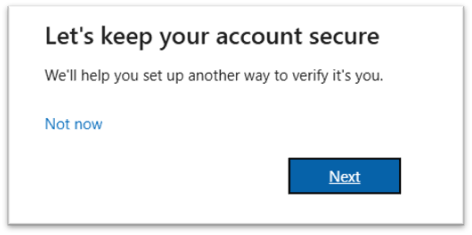
If you're seeing this, keep reading to learn what's going on and what to do about it.
For many organizations, this prompt started appearing in September 2026. It's the first phase of Microsoft's plan to retire SMS and voice calls as multifactor authentication methods because these methods are among the easiest to phish, intercept, or bypass with a SIM swap.
This change, however, can still affect you even if you are not using SMS or voice for multifactor authentication. This is because Microsoft is recommending that organizations use phishing-resistant methods for multifactor authentication. So, Microsoft is using the SMS/voice deprecation as an opportunity to nudge us towards phishing-resistant methods for multifactor authentication. As a result, even if you are not using SMS/voice today but are using the Microsoft Authenticator app (for push notifications or one-time code), you may still get this prompt to make your account more secure. The Authenticator app push notifications with number matching or the six-digit one-time code are not phishing resistant because the token can be stolen via a man-in-the-middle attack and replayed to gain access to systems.
According to Microsoft, the SMS/voice deprecation will play out as follows:
- September 1, 2026: Microsoft began enabling passkeys for users who are enabled for SMS or voice, and switched the registration campaign to Microsoft managed with passkeys as the target.
- February 1, 2027: Microsoft-provided SMS and voice authentication will be retired for all users (including internal guests) except global administrators and external users.
- Starting February 1: Users whose only available MFA method is SMS or voice will be required to register a passkey during sign-in. They will not be able to defer the registration and will not be able to log in unless they complete the passkey registration.
- July 1, 2027: SMS and voice will be retired for global admins and external users.
- Starting July 1, these users will be required to register a passkey.
Microsoft stated that it would update the registration campaign for tenants where SMS or voice authentication is enabled. The trigger is SMS or voice being enabled in the Authentication Methods policy or the legacy per-user MFA settings, and possibly the legacy self-service password reset (SSPR) settings. If SMS or voice is enabled in any of these locations, Microsoft may make the change to the registration campaign. As a result, the prompt targets users who are eligible to use SMS or voice; it does not verify whether users use either method.
The Registration Campaign settings can be found in the Entra Console (https://entra.microsoft.com) > Authentication methods > Registration campaign.
Microsoft is applying the following settings:
|
Item
|
Setting
|
Note
|
|
State
|
Microsoft Managed
|
The other options are enabled / disabled
|
|
Authentication method
|
Passkey (FIDO2)
|
Dictates that users will be prompted to register a passkey - as opposed to the Microsoft Authenticator
|
|
Days allowed to snooze
|
1
|
Ranges from 0-14 days and defines how long until a skipped prompt returns. In this case the user will receive the prompt a day later.
|
|
Limited number of snoozes
|
Disabled
|
Users can skip the registration indefinitely by clicking on the Not now link.
|
|
Include
|
All users
|
This can be changed to target specific groups or you may add a group to exclude.
|
It is these settings that are triggering the “Let’s keep your account secure” message. Because the campaign includes all users, the prompt appears for anyone who is enabled for passkeys and hasn’t registered one. Microsoft enabled passkeys for users in scope for SMS or voice, which in many tenants is all users, so even users who already use Authenticator will get it. In practice, the Microsoft managed campaign allows users to skip the registration by clicking on the Not now link in the message for an unlimited number of times until February 1. After that date, users who do not have an alternate method configured will be required to register a passkey to log in.
Opt out of the changes
Microsoft has given us a method to opt out of the registration campaign change / passkey enablement until February 1.
PATCH https://graph.microsoft.com/beta/policies/authenticationmethodspolicy
Content-Type: application/json
{
"optOutSettings": {
"passkeyDynamicMigration": true
}
}
You can run this from Graph Explorer or with Invoke-MgGraphRequest in PowerShell. It requires the Policy.ReadWrite.AuthenticationMethod permission (Authentication Policy Administrator role or higher).
Since Microsoft has probably already made the changes to your tenant, running this now would likely not reverse the changes. However, it would prevent Microsoft from reapplying the settings. This would allow you to safely reverse the changes manually. To do that, disable the registration campaign or change it to include a smaller scope of users or create an excluded users group. You should also remove or narrow the passkey targets Microsoft added under Authentication methods > Passkey (FIDO2).
Self-Service Password Reset (SSPR)
The SMS and voice deprecation also applies to SSPR, meaning these methods will not be available for resetting passwords unless you configure your own telephony provider. Do note, Microsoft is also retiring security questions in March of 2027 as well.
A second SSPR change arrives first. Starting in November 2026, SSPR will only accept authentication methods that users have registered themselves. Phone numbers and email addresses populated in the directory (for example, synced from on-premises Active Directory) will no longer count unless the user has registered them.
If you are using SSPR you should review the settings to make sure you are not creating a scenario that will cut users off from being able to reset passwords after the phone methods have been deprecated. For example, if your organization requires two methods to reset a password, and a user has registered only email and mobile phone, that user will have just one usable method after SMS and voice are shut off and they won’t be able to reset their password. Even worse, passkeys are not an option for SSPR, so registering a passkey will not help users meet the requirements. As such, you need to establish a transition plan for SSPR and ensure users will have registered enough methods to satisfy the requirements that SSPR requires.
Summary and to-do’s
The “Let’s keep your account secure” prompt is Microsoft giving advance warning that SMS and voice as authentication methods are ending in Entra ID. It kicked off a Microsoft managed registration campaign in September that nudges users to register passkeys as an authentication method, which is now the preferred method since it is the most secure. For now, users can skip the prompt to register a passkey. Though you can change the registration campaign to suit the needs of the organization, support for SMS/voice ends on February 1, and users with no other authentication methods will be forced to register a passkey before they can sign in. With this, here is what you should do prior to February 1:
- Find phone-dependent users. Run Microsoft’s SMS/Voice policy scanner to see who the SMS and voice policies target. Then use the User registration details report in the Entra admin center to find users whose only registered methods are SMS or voice:
- Review the areas where SMS and voice can be enabled. More specifically, check the Authentication Methods Policy, the legacy per-user MFA settings, and the legacy SSPR settings. Also confirm the migration status is “Migration complete” under Authentication methods > Policies > Migration status. This refers to the move from the legacy MFA and SSPR policies, which were deprecated in September 2025, to the Authentication Methods policy. If the status is anything other than complete, SMS and voice can still be enabled through the legacy settings even when they are turned off in the Authentication Methods Policy.
- Take control of the registration campaign. Consider changing it from Microsoft managed to enabled, and craft it to meet the needs of the organization.
- Decide on the September changes. Choose whether to keep Microsoft’s automatic passkey enablement or opt out with the passkeyDynamicMigration setting in Microsoft Graph. Opting out doesn’t change the February 1 deadline.
- Review your passkey (FIDO2) policy. If you require hardware keys or attestation, make sure Microsoft’s automatic change didn’t allow synced passkeys.
- Enable the replacement methods. Turn on Microsoft Authenticator and passkeys for your users. Add Windows Hello for Business or FIDO2 keys where they fit.
- Check SSPR readiness. Make sure every user has enough registered methods, other than SMS, voice and passkeys, to meet your password reset policy. Do this before the November 2026 change that requires registered methods.
- Cover the edge cases. Plan for users without smartphones, shared or VDI devices, guests, administrators and break-glass accounts. FIDO2 keys, OATH tokens and Temporary Access Pass handle most of them.
- Set up a telephony provider if you need one. If there is a requirement to continue to use SMS / voice it is possible to provide these authentication methods through a non-Microsoft telephony provider. Configuration opens October 30, 2026. See this link: Choose a telephony provider for SMS and voice authentication - Microsoft Entra ID | Microsoft Learn
- Communicate with users. Before the prompt reaches them, explain why it’s appearing and what they should register.
- Watch progress. Re-run the registration report regularly and follow up with stragglers well before February 1, 2027.
Lastly, the organization should develop a strategy for implementing passkeys. While it is admirable that Microsoft is nudging organizations to use passkeys, the default settings that are being applied may not suit the needs of the organization. As such, it is important to understand what the default policies allow, what other options are available, and then determine how passkeys should be implemented. Do not assume what Microsoft has configured is the correct path for the organization. Perhaps I just discovered what my next blog article will be on.