Written with contributions from Brian Wagner, Practice Director - EUC and Cloud, Ryan Lee, Senior Solutions Architect, Gotham Technology Group, and Dean Cefola, Principal Technical Marketing Manager, Nerdio.
Windows 365 offers a predictable, per-user monthly pricing model that simplifies cloud VDI budgeting. However, without proper oversight, costs can escalate due to over-provisioned resources and underutilized licenses. Proactive cost management is essential to maximize your return on investment and ensure your IT budget is allocated efficiently as your organization scales.
How Does Windows 365 Pricing Work?
Understanding the core components of your bill is the first step toward optimizing it. The pricing model differs slightly between the Business and Enterprise editions, with the latter offering more flexibility and potential for savings.
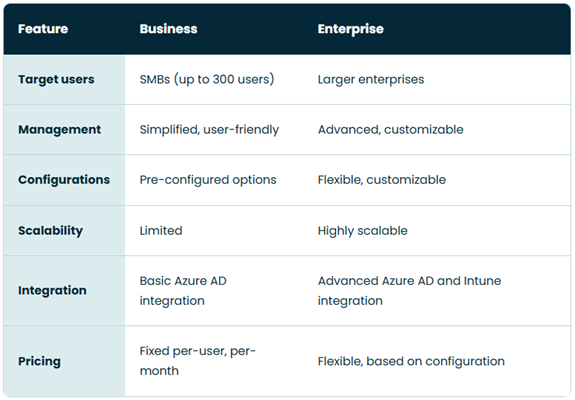
Windows 365 Business vs. Enterprise Pricing
While both editions are licensed on a fixed per-user, per-month basis, their underlying cost structures are designed for different use cases.
- Windows 365 Business: Designed for simplicity in organizations with up to 300 users. The price is all-inclusive, with no separate infrastructure or networking costs, making it highly predictable.
- Windows 365 Enterprise: Designed for larger organizations requiring more advanced management and integration. The license cost is also fixed, but it requires you to manage networking components within your own Azure subscription, which can introduce variable costs.
The Main Components of Windows 365 Enterprise Costs
For Windows 365 Enterprise, your total monthly cost is a combination of fixed and potential variable expenses¹.
- Fixed Costs: This is the primary license fee for each user's Cloud PC configuration (vCPU, RAM, and storage). You choose a specific size, and that determines the monthly price.
- Variable Costs: While the Cloud PC is a flat fee, data transfer out of the Azure network (known as network egress) can incur additional charges. This typically occurs when users transfer large files from their Cloud PC to an on-premises location or another cloud.
- Licensing Program Benefits: Microsoft programs, such as the Azure Hybrid Benefit, can provide significant discounts on your Windows 365 licenses if you already own eligible Windows Server licenses.
What Are The Most Effective Strategies For Reducing Windows 365 Expenses?
Implementing a few key strategies can have a significant impact on your monthly spend. These tactics focus on aligning resources with actual user needs and ensuring you only pay for what you use.
Choose the Right Size for Your Cloud PCs
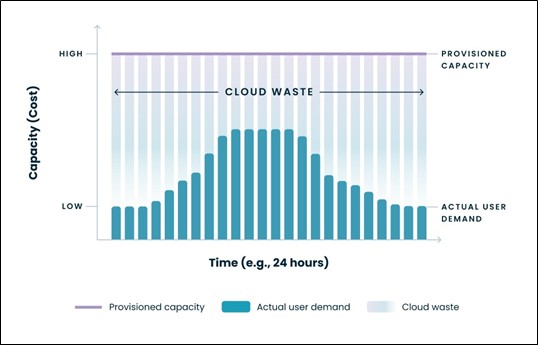
One of the most common sources of wasted cloud spend is "over-provisioning"—assigning users a Cloud PC with more CPU or RAM than they need. The process of "right-sizing" involves matching Cloud PC resources to user workload requirements. Manually tracking performance for each user to make these decisions is difficult and time-consuming at scale.
Advanced management platforms solve this challenge by providing performance monitoring tools to help you make data-driven sizing decisions. These platforms can automate the resizing of Cloud PCs based on historical usage data, ensuring users have the power they need without paying for idle resources.
Carefully Manage Windows 365 Licenses
Every assigned license that isn't being used is a direct, unnecessary cost. Effective license lifecycle management ensures that licenses are promptly assigned to new employees and, crucially, reclaimed from those who leave the company or no longer require a Cloud PC. This manual process of tracking and unassigning licenses is often error-prone.
Automation is the most effective solution. Management and automation platforms can integrate with your identity system, such as Azure AD, to automatically unassign licenses when a user account is disabled. This creates a closed-loop process that eliminates licensing waste without manual intervention.
Azure Hybrid Benefit
If your organization already owns Windows Server licenses with active Software Assurance, the Azure Hybrid Benefit can reduce the cost of your Windows 365 Enterprise licenses. When you provision your Cloud PCs with a connection to an Azure virtual network, you can apply this benefit. Effectively managing and applying this benefit requires careful tracking of your existing licenses to ensure compliance and maximize savings.
Control Network Egress Costs
For Windows 365 Enterprise, significant data transfers from a Cloud PC to a location outside of Azure can result in network fees. To control these variable costs, you can encourage users to keep data within the Azure ecosystem. For example, storing and sharing files using OneDrive or Azure Files instead of transferring them to on-premises servers can help minimize or eliminate egress traffic charges.
How Can You Automate Windows 365 Cost Optimization at Scale?
While manual optimization is possible for a few users, it quickly becomes unmanageable for larger teams. Automation is the key to implementing cost-saving strategies consistently and efficiently across your entire organization².
Third-party Management Platforms
Third-party management platforms are essential for operating a Windows 365 environment at scale. They provide a single, unified console to simplify complex tasks, offering capabilities that go beyond the native management tools. Platforms like Nerdio Manager for Enterprise are specifically designed to deliver deep automation and cost-efficiency for Windows 365 and Azure Virtual Desktop environments.
Automating the Lifecycle of a Cloud PC
A fully automated lifecycle ensures costs are controlled at every stage of a user's journey.
- Automated Provisioning: New users are automatically assigned the correct, pre-defined Cloud PC size based on their role or group membership in Azure AD.
- Automated Resizing: The platform continuously monitors performance and can automatically resize a Cloud PC if it is consistently over or underutilized.
- Automated De-provisioning: As soon as a user is offboarded, their license is automatically reclaimed and returned to the available pool, instantly stopping the associated cost.
How Do You Continuously Monitor And Govern Windows 365 Spending?
Cost optimization is not a one-time project; it's an ongoing process. Establishing clear governance and continuously monitoring your environment ensures that your savings are sustained over the long term.
KPIs for Cost Optimization
To maintain control over your spending, you should regularly track key performance indicators (KPIs). Important metrics include your total license cost, the average cost per user or department, license utilization rates, and trends in right-sizing actions. Tracking these helps you forecast budgets accurately and demonstrate the value of your optimization efforts.
Cost Management Policies and Alerts
Setting up proactive governance is critical. Advanced management platforms allow you to implement powerful cost-control policies. For example, you can set budgets for specific departments, configure alerts that notify you of unexpected cost spikes, and schedule automated reports that provide clear visibility to all business stakeholders.
The Key To Long-term Windows 365 Cost Efficiency
The key to long-term cost efficiency with Windows 365 is moving from reactive fixes to a proactive, automated strategy. By combining best practices like right-sizing and diligent license management with a powerful automation platform, you can eliminate waste, reduce administrative burden, and ensure you are getting the maximum value from your investment in Cloud PCs.
How To Get Started
Work with your Gotham representative to design a cost optimization plan that uses automation to align with your user workflows.
¹ https://getnerdio.com/windows-365-subscription/
² https://getnerdio.com/reduce-w365-costs/
About the Authors
Dean Cefola

Principal Technical Marketing Manager at Nerdio, with over 25 years of IT experience. Microsoft Alumni and owner/content creator of The Azure Academy YouTube channel where he's helped millions of IT Pros around the world learn about Azure, Azure Virtual Desktop, Windows 365, and Microsoft Intune.
Brian Wagner

With Gotham since its inception, Brian has more than 20 years’ experience in technology, and is an expert in the virtualization space, with a strong focus on Microsoft, Citrix, VMware, and cloud technologies. Possesses strong leadership and management skills. Experienced in financial, pharmaceutical, insurance, education, healthcare, and legal enterprises. Engages with clients throughout the project lifecycle, from preliminary discussions, through scoping, authoring of proposals, project kickoff, implementation, training, and support.
Ryan Lee

Ryan is a Senior Solutions Architect responsible for architecture and design of application, desktop, and server solutions. Ryan holds multiple technical certifications and has worked as an IT analyst, engineer, and consultant for companies in a variety of industries.